> ## Documentation Index
> Fetch the complete documentation index at: https://help.trypawgress.com/llms.txt
> Use this file to discover all available pages before exploring further.
# Service vs. Promotional Messages
> Which messages count as promotional, who can receive them, how to record a client's consent, and how unsubscribing works
## Two Kinds of Message
Every message you send from Pawgress is either a **service message** or a **promotional message**. You pick one in the **Kind of message** setting before sending.
| | Service message | Promotional message |
| - | - | - |
| **What it's for** | Updates about existing clients, bookings, sessions, or training progress | Promoting classes, packages, special offers, or other services |
| **Examples** | Class moved for rain · Running late · Bring a towel · This week's homework | New fall classes · A package discount · A workshop you're running |
| **Who receives it** | All your clients | Only clients who can receive promotions (see below) |
| **Unsubscribed clients** | Still receive it | Don't receive it |
Service is the default.
**If any part of it promotes something, it's promotional.**
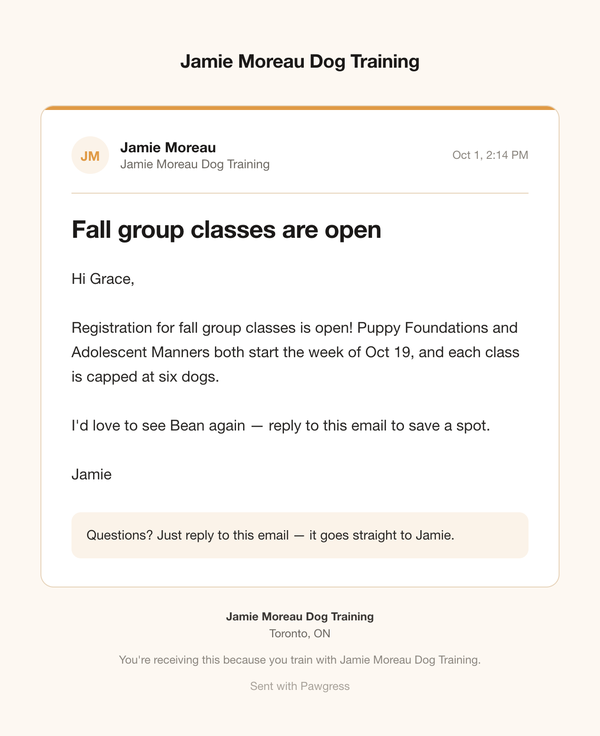
A schedule change that ends with *"PS — fall classes are 10% off!"* is a promotional message. Sending it from a session card doesn't make it a service message.
**Why this matters**
Anti-spam laws — Canada's **CASL**, and similar rules in the US, UK, EU, and elsewhere — only allow commercial email to people who've agreed to it or have a qualifying relationship with you. Pawgress applies conservative rules so your promotional messages only reach clients you can show you're allowed to email. This guide isn't legal advice; check with a professional if you're unsure about your situation.
## The Promotional-Content Check
When you choose **Service message**, Pawgress scans your subject, message, links, and attachment names for things that often signal a promotion — prices, discounts (*20% off*, *early bird*), calls to buy (*sign up now*, *book your spot*), new offerings, or a link to a booking page or your website.
If something matches, you'll see which words triggered it and must either:
* switch to **Promotional message**, or
* tick **This message has no promotional content** to confirm it's a genuine service message
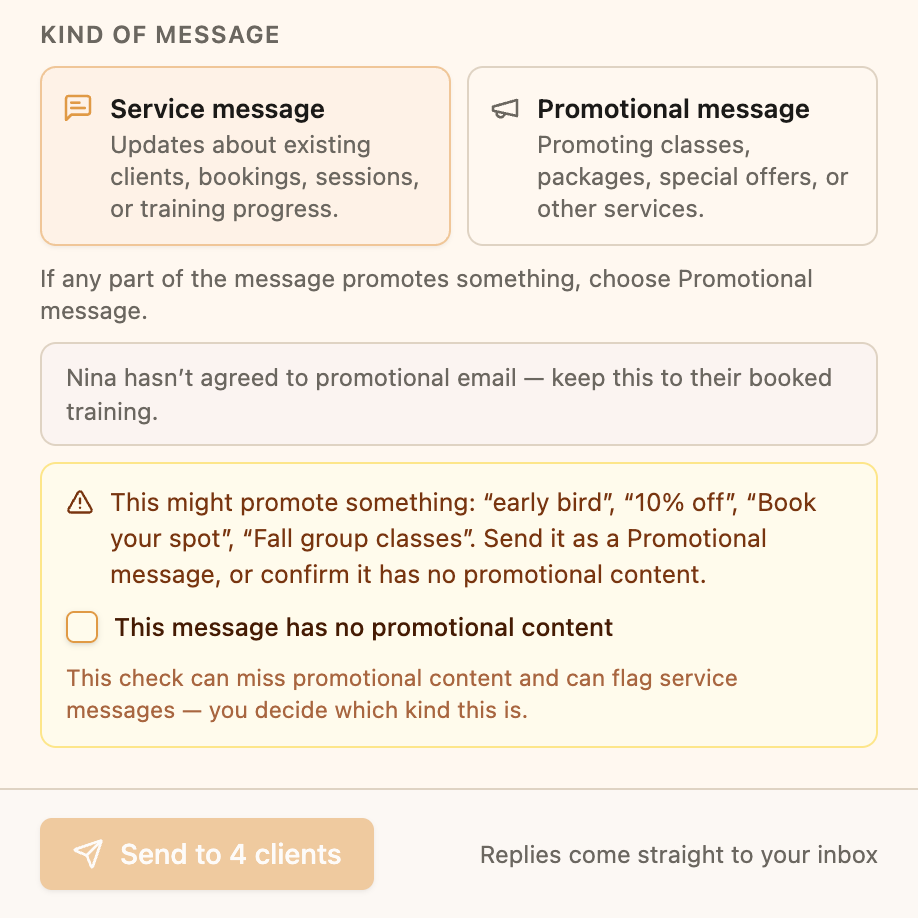 The check is a helpful nudge, not a decision. It can miss promotional content, and it can flag service messages that happen to use a trigger word — you decide which kind your message is.
## Who Can Receive Promotional Messages
A client can receive promotions when they **haven't unsubscribed**, and at least one of these is true:
| Basis | What counts | How long it lasts |
| - | - | - |
| **Consented** | The client agreed to receive promotional email — they opted in themselves, or you recorded their consent | No expiry |
| **Past purchase** | They paid you for a package (a positive amount, not fully refunded) | 24 months from the payment |
| **Service contract** | You've recorded a signed written agreement for your services | While ongoing, and 24 months after it ends |
These **don't** count on their own: attending sessions, an unpaid enrollment, an invite, or simply being in your client list.
### What happens when you send
When you pick **Promotional message**, clients who can't receive it are marked **Unsubscribed** or **No consent** in the To list, and the panel tells you how many won't get it — for example *"2 clients won't receive this — no consent for promotional email on record."* The send button shows the real count, like **Send to 4 of 6**. Everyone else gets the message as normal.
## Recording Consent on a Client
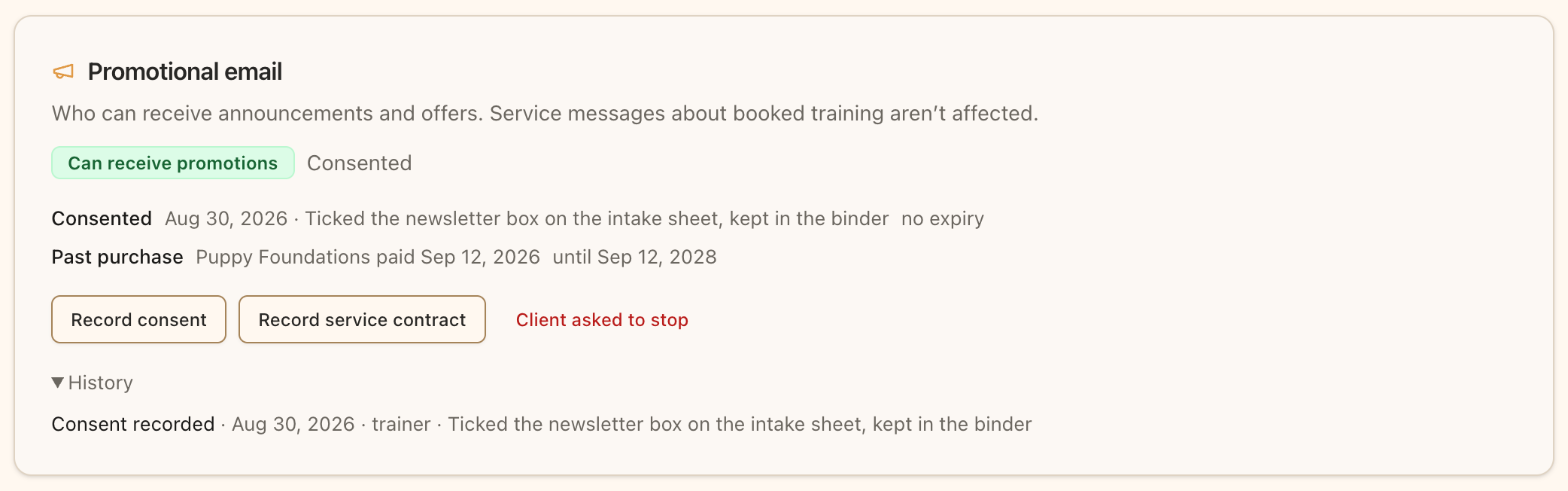
Each client's page has a **Promotional email** card on the **Overview** tab. It shows whether they **Can receive promotions**, on what basis, and until when, plus a full **History** of consent changes.
### Record consent
If a client told you they'd like your news and offers — in person, on a paper intake form, or by replying to an email:
1. Open the client and find the **Promotional email** card
2. Click **Record consent**
3. Choose **How** they gave it (In person, Paper form, Replied by email, Other), the **Date**, and describe the **Evidence**, e.g. *"Ticked the newsletter box on the intake sheet, kept in the binder"*
Only record consent the client actually gave, and describe where the evidence is so you can show it later if asked.
### Record a service contract
If the client signed a written training agreement:
1. Click **Record service contract**
2. Enter the **Start** date, and an **End** date or tick **Ongoing**
3. Optionally link the **Signed form** from their completed [client forms](/guides/getting-started/client-forms), and add a description
Promotions are allowed while the contract is ongoing and for 24 months after it ends. You can **Remove contract** later if it was recorded by mistake.
### Past purchases are automatic
You don't need to record purchases. When a client pays for a package — online or with **Mark as Paid** — Pawgress picks it up automatically and shows it as the basis, e.g. *"Puppy Foundations paid Sep 12, 2026."*
## Unsubscribing
### How clients unsubscribe
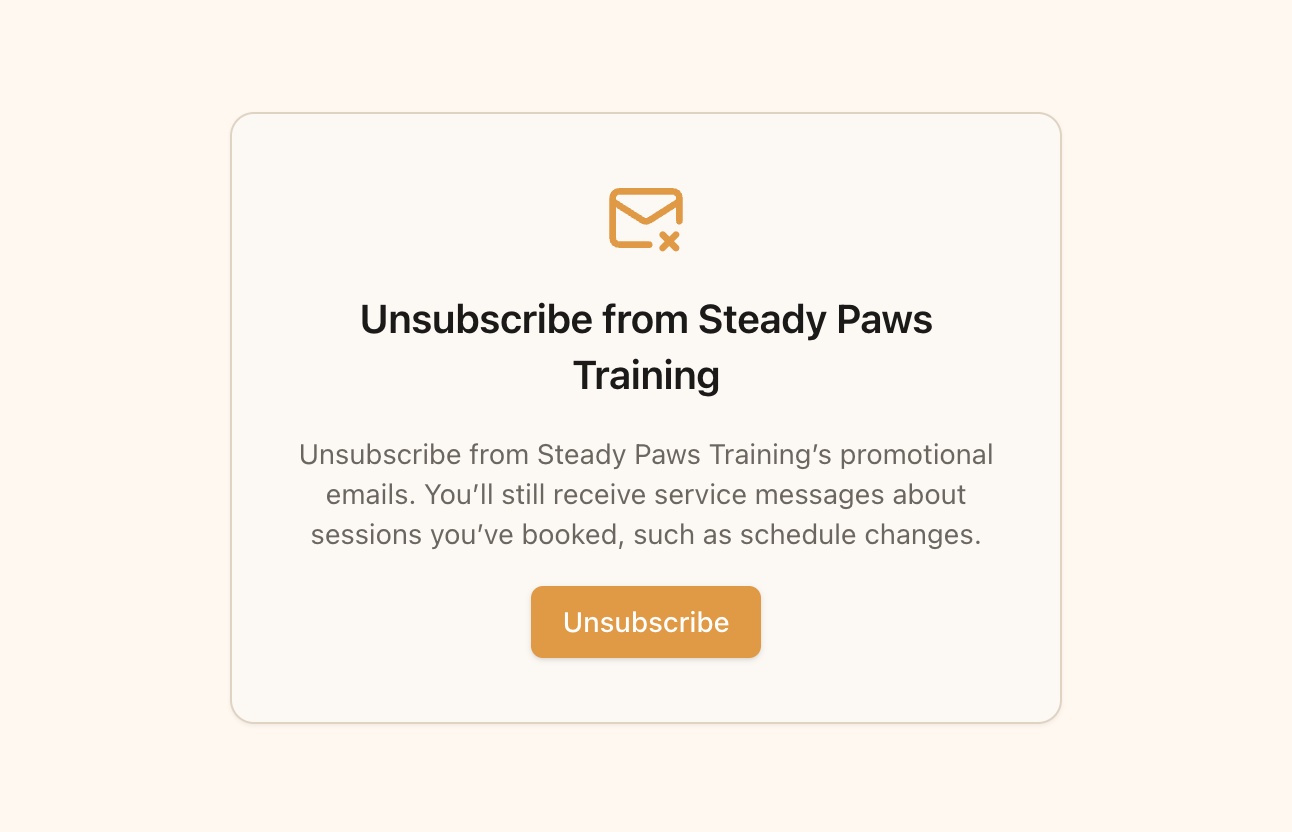
Every message you send includes an **unsubscribe link** in the footer. Clicking it stops **promotional** messages from you. Your client still receives service messages about sessions they've booked, such as schedule changes — the link says so.
Unsubscribing applies only to you. It doesn't affect other trainers or Pawgress's own emails.
The check is a helpful nudge, not a decision. It can miss promotional content, and it can flag service messages that happen to use a trigger word — you decide which kind your message is.
## Who Can Receive Promotional Messages
A client can receive promotions when they **haven't unsubscribed**, and at least one of these is true:
| Basis | What counts | How long it lasts |
| - | - | - |
| **Consented** | The client agreed to receive promotional email — they opted in themselves, or you recorded their consent | No expiry |
| **Past purchase** | They paid you for a package (a positive amount, not fully refunded) | 24 months from the payment |
| **Service contract** | You've recorded a signed written agreement for your services | While ongoing, and 24 months after it ends |
These **don't** count on their own: attending sessions, an unpaid enrollment, an invite, or simply being in your client list.
### What happens when you send
When you pick **Promotional message**, clients who can't receive it are marked **Unsubscribed** or **No consent** in the To list, and the panel tells you how many won't get it — for example *"2 clients won't receive this — no consent for promotional email on record."* The send button shows the real count, like **Send to 4 of 6**. Everyone else gets the message as normal.
## Recording Consent on a Client
Each client's page has a **Promotional email** card on the **Overview** tab. It shows whether they **Can receive promotions**, on what basis, and until when, plus a full **History** of consent changes.

### Record consent
If a client told you they'd like your news and offers — in person, on a paper intake form, or by replying to an email:
1. Open the client and find the **Promotional email** card
2. Click **Record consent**
3. Choose **How** they gave it (In person, Paper form, Replied by email, Other), the **Date**, and describe the **Evidence**, e.g. *"Ticked the newsletter box on the intake sheet, kept in the binder"*
Only record consent the client actually gave, and describe where the evidence is so you can show it later if asked.
### Record a service contract
If the client signed a written training agreement:
1. Click **Record service contract**
2. Enter the **Start** date, and an **End** date or tick **Ongoing**
3. Optionally link the **Signed form** from their completed [client forms](/guides/getting-started/client-forms), and add a description
Promotions are allowed while the contract is ongoing and for 24 months after it ends. You can **Remove contract** later if it was recorded by mistake.
### Past purchases are automatic
You don't need to record purchases. When a client pays for a package — online or with **Mark as Paid** — Pawgress picks it up automatically and shows it as the basis, e.g. *"Puppy Foundations paid Sep 12, 2026."*
## Unsubscribing
### How clients unsubscribe
Every message you send includes an **unsubscribe link** in the footer. Clicking it stops **promotional** messages from you. Your client still receives service messages about sessions they've booked, such as schedule changes — the link says so.
Unsubscribing applies only to you. It doesn't affect other trainers or Pawgress's own emails.
 ### If a client asks you directly
If a client tells you they don't want promotions anymore, open their **Promotional email** card and click **Client asked to stop**, then **Unsubscribe them**.
**Only the client can opt back in.** Once someone has unsubscribed, you can't record new consent for them. They can opt back in themselves from their own account settings.
## What Clients See in Their Account
Clients with a Pawgress account see an **Emails from \[your business]** card in their account settings. It explains they'll always get messages about sessions they've booked, and has a checkbox: *"Send me news, new classes and offers from \[your business] by email."* Ticking it records their consent; unticking it unsubscribes them.
## Your Business Details in Every Email
Every message — service or promotional — ends with your business name, mailing address, and contact details, plus the unsubscribe link. Anti-spam law requires this identification, which is why Pawgress asks for your [business details](/guides/messaging/connect-email#adding-your-business-details) before your first message.
## Next Steps
* [Message your clients](/guides/messaging/message-clients)
* [Save promotional messages as templates](/guides/messaging/message-templates)
This documentation is built and hosted on [Mintlify](https://mintlify.com), a developer documentation platform.
### If a client asks you directly
If a client tells you they don't want promotions anymore, open their **Promotional email** card and click **Client asked to stop**, then **Unsubscribe them**.
**Only the client can opt back in.** Once someone has unsubscribed, you can't record new consent for them. They can opt back in themselves from their own account settings.
## What Clients See in Their Account
Clients with a Pawgress account see an **Emails from \[your business]** card in their account settings. It explains they'll always get messages about sessions they've booked, and has a checkbox: *"Send me news, new classes and offers from \[your business] by email."* Ticking it records their consent; unticking it unsubscribes them.
## Your Business Details in Every Email
Every message — service or promotional — ends with your business name, mailing address, and contact details, plus the unsubscribe link. Anti-spam law requires this identification, which is why Pawgress asks for your [business details](/guides/messaging/connect-email#adding-your-business-details) before your first message.
## Next Steps
* [Message your clients](/guides/messaging/message-clients)
* [Save promotional messages as templates](/guides/messaging/message-templates)
This documentation is built and hosted on [Mintlify](https://mintlify.com), a developer documentation platform.