Deleting your account is permanent and can’t be undone. Once it’s done you’re signed out straight away and you can’t sign back in with that login.
This can’t be undone. If you might want your account back later, don’t delete it. Download or note down anything you need first, such as client details, reports, and payment records.
Run through this checklist before you continue:
Cancel your Pro subscription if you have one, so you aren’t billed again. See Managing Your Subscription.
Let your clients know if you’re a trainer, so they can arrange training elsewhere. Your clients can’t reach you in Pawgress once your account is gone.
Save anything you need. Your personal information, pet profiles and data, and account history are removed, and you lose access to them.
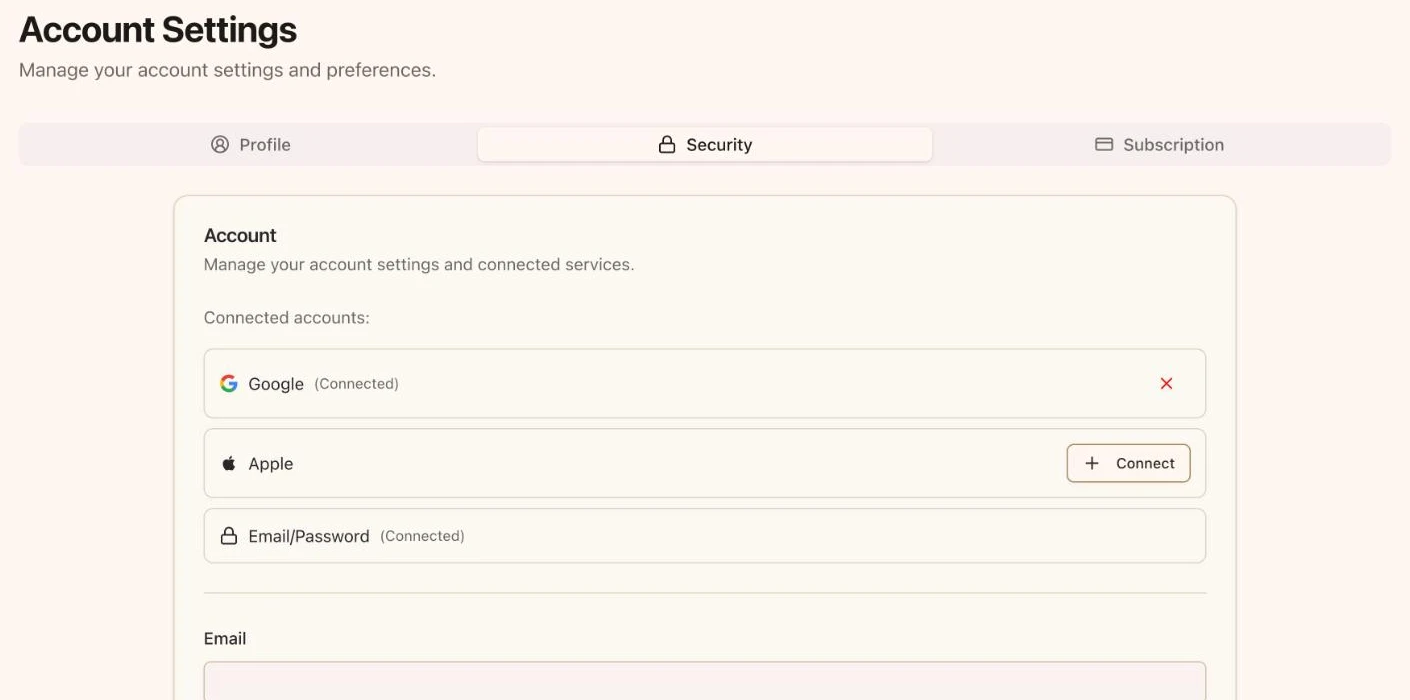
Click your avatar in the top-right corner and select Account.
Trainers: open the Security tab.
Clients: open the Account tab.
The Security tab on a trainer's Account Settings page
2
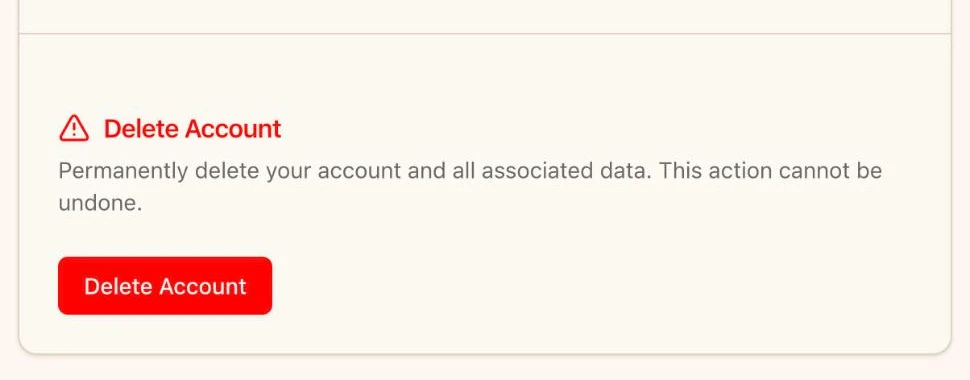
Scroll to Delete Account
The Delete Account section is at the bottom of the page, under the password settings. Click the red Delete Account button.
The Delete Account section at the bottom of the page
3
Confirm
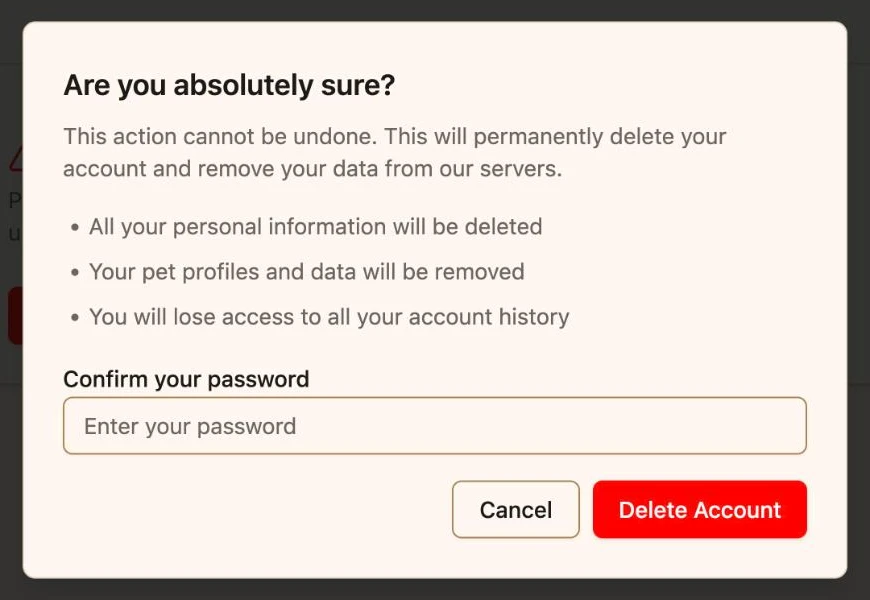
A confirmation window opens and asks if you’re absolutely sure. It lists what will happen to your information, pet profiles, and account history.If you sign in with an email and password, enter your password in Confirm your password. If you sign in with Google or Apple, there’s no password field.Click Delete Account to confirm, or Cancel to keep your account.
The confirmation window. Click Cancel to back out.
4
You're signed out
You’ll see an Account Deleted message and return to the Pawgress homepage. Your account is gone, and you’re signed out on this device.
The button is at the very bottom of the account settings page, below the password section. Scroll all the way down.If you’re a developer using View as to look at another person’s account, account settings are hidden. They’d act on your own login, not theirs, so deletion isn’t available there.
The confirmation uses your Pawgress password, not your email password. If you’ve forgotten it, sign out and use Forgot password? on the sign-in page to set a new one. Then try again.
{"docsConfig":{"theme":"mint","$schema":"https://mintlify.com/docs.json","name":"Pawgress Help Center","colors":{"primary":"#E09A45","light":"#F4B968","dark":"#C67A2E"},"logo":{"light":"https://mintcdn.com/pawgress/F6CHWN49zp5cqq6Z/logo/light.svg?fit=max\u0026auto=format\u0026n=F6CHWN49zp5cqq6Z\u0026q=85\u0026s=c1c1e0b1d92f2f547534bd1276e6a6e2","dark":"https://mintcdn.com/pawgress/F6CHWN49zp5cqq6Z/logo/dark.svg?fit=max\u0026auto=format\u0026n=F6CHWN49zp5cqq6Z\u0026q=85\u0026s=0b5ca523e5ed6440699d7be3e64793c2"},"favicon":"https://mintcdn.com/pawgress/F6CHWN49zp5cqq6Z/favicon.ico?fit=max\u0026auto=format\u0026n=F6CHWN49zp5cqq6Z\u0026q=85\u0026s=977e4a2541348a7d518e910385a297b9","navbar":{"links":[{"href":"https://trypawgress.com/support","label":"Support"}],"primary":{"type":"button","label":"Go to App","href":"https://trypawgress.com"}},"seo":{"metatags":{"canonical":"https://help.trypawgress.com"}},"contextual":{"options":["copy","view","chatgpt","claude","perplexity","mcp","cursor","vscode"],"display":"header"},"styling":{"latex":false},"navigation":{"global":{"anchors":[{"anchor":"Pawgress App","icon":"house","href":"https://trypawgress.com"},{"anchor":"Support","icon":"life-ring","href":"https://trypawgress.com/support"}]},"pages":[]}},"deployment":{"deploymentMetadataValue":{"subdomain":"pawgress","hasAudioNarration":false,"actualSubdomain":"pawgress","customDomains":["help.trypawgress.com"],"gitSource":{"type":"github","owner":"mikesmvl","repo":"pawgress","deployBranch":"main","contentDirectory":"docs","isPrivate":true,"mountPath":"","label":""},"feedback":{"thumbs":true},"entitlements":{},"buildId":"6af240a3e9fa2b0fb7fff910","clientVersion":"0.0.4111","searchFilterCounts":[{"language":"default","tag":"Guides","count":31},{"language":"default","tag":"Getting Started","count":8},{"language":"default","tag":"Integration","count":6},{"language":"default","tag":"Overview","count":6},{"language":"default","tag":"Scheduling","count":5},{"language":"default","tag":"Messaging","count":4},{"language":"default","tag":"Billing","count":2}]},"assistantConfig":{"enableAskAiButton":false,"enableStarterQuestions":false,"enableAskAiSearchBar":true},"basePath":"","hasChatPermissions":false,"hasWebMcpPermissions":false,"toggles":[{"name":"kill-isr","enabled":true,"variant":{"name":"disabled","enabled":false,"feature_enabled":true},"impressionData":false},{"name":"custom-rbac-roles","enabled":true,"variant":{"name":"disabled","enabled":false,"feature_enabled":true},"impressionData":false},{"name":"agent-mintlify-slack","enabled":true,"variant":{"name":"disabled","enabled":false,"feature_enabled":true},"impressionData":false},{"name":"agent-integrations-settings","enabled":true,"variant":{"name":"disabled","enabled":false,"feature_enabled":true},"impressionData":false},{"name":"rbac-expansion","enabled":true,"variant":{"name":"disabled","enabled":false,"feature_enabled":true},"impressionData":false},{"name":"automations-pr-grouping","enabled":true,"variant":{"name":"disabled","enabled":false,"feature_enabled":true},"impressionData":false},{"name":"custom-prefix","enabled":true,"variant":{"name":"disabled","enabled":false,"feature_enabled":true},"impressionData":false},{"name":"analytics-v7","enabled":true,"variant":{"name":"disabled","enabled":false,"feature_enabled":true},"impressionData":false},{"name":"user-flows-analytics","enabled":true,"variant":{"name":"disabled","enabled":false,"feature_enabled":true},"impressionData":false},{"name":"no-publish-flow","enabled":true,"variant":{"name":"disabled","enabled":false,"feature_enabled":true},"impressionData":false},{"name":"workos-onboarding","enabled":true,"variant":{"name":"disabled","enabled":false,"feature_enabled":true},"impressionData":false},{"name":"llms-txt-v2","enabled":true,"variant":{"name":"disabled","enabled":false,"feature_enabled":true},"impressionData":false},{"name":"snapshot-serving-live","enabled":true,"variant":{"name":"disabled","enabled":false,"feature_enabled":true},"impressionData":false},{"name":"stripTemperatureMiddleware","enabled":true,"variant":{"name":"disabled","enabled":false,"feature_enabled":true},"impressionData":false},{"name":"support-platform-pylon-zendesk","enabled":true,"variant":{"name":"disabled","enabled":false,"feature_enabled":true},"impressionData":false},{"name":"snapshot-serving","enabled":true,"variant":{"name":"disabled","enabled":false,"feature_enabled":true},"impressionData":false},{"name":"instant-rollback","enabled":true,"variant":{"name":"disabled","enabled":false,"feature_enabled":true},"impressionData":false},{"name":"granular-notifications-server","enabled":true,"variant":{"name":"disabled","enabled":false,"feature_enabled":true},"impressionData":false},{"name":"granular-notifications","enabled":true,"variant":{"name":"disabled","enabled":false,"feature_enabled":true},"impressionData":false},{"name":"automations-fable","enabled":true,"variant":{"name":"disabled","enabled":false,"feature_enabled":true},"impressionData":false},{"name":"fixed-ai-action-pricing","enabled":true,"variant":{"name":"disabled","enabled":false,"feature_enabled":true},"impressionData":false},{"name":"automation-resolve-merge-conflict","enabled":true,"variant":{"name":"disabled","enabled":false,"feature_enabled":true},"impressionData":false},{"name":"scoped-publishing","enabled":true,"variant":{"name":"disabled","enabled":false,"feature_enabled":true},"impressionData":false},{"name":"mintql","enabled":true,"variant":{"name":"disabled","enabled":false,"feature_enabled":true},"impressionData":false},{"name":"page-level-analytics","enabled":true,"variant":{"name":"disabled","enabled":false,"feature_enabled":true},"impressionData":false},{"name":"editor-version-history-v2","enabled":true,"variant":{"name":"disabled","enabled":false,"feature_enabled":true},"impressionData":false},{"name":"billing-page-v2","enabled":true,"variant":{"name":"disabled","enabled":false,"feature_enabled":true},"impressionData":false},{"name":"full-page-search","enabled":true,"variant":{"name":"disabled","enabled":false,"feature_enabled":true},"impressionData":false},{"name":"workspace-projects","enabled":true,"variant":{"name":"disabled","enabled":false,"feature_enabled":true},"impressionData":false},{"name":"assistant-v5","enabled":true,"variant":{"name":"disabled","enabled":false,"feature_enabled":true},"impressionData":false},{"name":"fork-pr-previews","enabled":true,"variant":{"name":"disabled","enabled":false,"feature_enabled":true},"impressionData":false},{"name":"revalidation-jwt","enabled":true,"variant":{"name":"disabled","enabled":false,"feature_enabled":true},"impressionData":false},{"name":"workos-sso-scim","enabled":true,"variant":{"name":"disabled","enabled":false,"feature_enabled":true},"impressionData":false},{"name":"hobby-abuse-scan","enabled":true,"variant":{"name":"disabled","enabled":false,"feature_enabled":true},"impressionData":false},{"name":"dashboard-inbox","enabled":true,"variant":{"name":"disabled","enabled":false,"feature_enabled":true},"impressionData":false},{"name":"workos-signup","enabled":true,"variant":{"name":"disabled","enabled":false,"feature_enabled":true},"impressionData":false},{"name":"turbopuffer-dual-write","enabled":true,"variant":{"name":"disabled","enabled":false,"feature_enabled":true},"impressionData":false},{"name":"workos-enabled","enabled":true,"variant":{"name":"disabled","enabled":false,"feature_enabled":true},"impressionData":false},{"name":"approve-review-flow","enabled":true,"variant":{"name":"disabled","enabled":false,"feature_enabled":true},"impressionData":false},{"name":"editor-metadata","enabled":true,"variant":{"name":"disabled","enabled":false,"feature_enabled":true},"impressionData":false},{"name":"sso-setup-deadline-banner","enabled":true,"variant":{"name":"disabled","enabled":false,"feature_enabled":true},"impressionData":false},{"name":"turbopuffer-serve","enabled":true,"variant":{"name":"disabled","enabled":false,"feature_enabled":true},"impressionData":false},{"name":"live-agents","enabled":true,"variant":{"name":"disabled","enabled":false,"feature_enabled":true},"impressionData":false}],"privacy":{"consentBanner":{"enabled":true}},"googleFontsInlined":false},"customCss":[],"page":{"pagePath":"guides/overview/delete-account","slug":"/guides/overview/delete-account","pageMetadata":{"title":"Deleting Your Account","description":"How to permanently delete your Pawgress account, what to do first, and what to expect afterwards","href":"/guides/overview/delete-account"},"description":{"compiledSource":"\"use strict\";\nconst {jsx: _jsx} = arguments[0];\nconst {useMDXComponents: _provideComponents} = arguments[0];\nfunction _createMdxContent(props) {\n const _components = {\n p: \"p\",\n ..._provideComponents(),\n ...props.components\n };\n return _jsx(_components.p, {\n children: \"How to permanently delete your Pawgress account, what to do first, and what to expect afterwards\"\n });\n}\nfunction MDXContent(props = {}) {\n const {wrapper: MDXLayout} = {\n ..._provideComponents(),\n ...props.components\n };\n return MDXLayout ? _jsx(MDXLayout, {\n ...props,\n children: _jsx(_createMdxContent, {\n ...props\n })\n }) : _createMdxContent(props);\n}\nreturn {\n default: MDXContent\n};\n","frontmatter":{},"scope":{}},"pageType":"default","mdx":{"mdxSource":{"compiledSource":"\"use strict\";const{Fragment:_Fragment,jsx:_jsx,jsxs:_jsxs}=arguments[0];const{useMDXComponents:_provideComponents}=arguments[0];function _createMdxContent(props){const _components={a:`a`,img:`img`,li:`li`,p:`p`,strong:`strong`,ul:`ul`,..._provideComponents(),...props.components},{Frame,Heading,Step,Steps,Warning}=_components;if(!Frame)_missingMdxReference(`Frame`,true);if(!Heading)_missingMdxReference(`Heading`,true);if(!Step)_missingMdxReference(`Step`,true);if(!Steps)_missingMdxReference(`Steps`,true);if(!Warning)_missingMdxReference(`Warning`,true);return _jsxs(_Fragment,{children:[_jsx(Heading,{level:`2`,id:`before-you-delete`,children:`Before you delete`}),`\n`,_jsx(_components.p,{children:`Deleting your account is permanent and can’t be undone. Once it’s done you’re signed out straight away and you can’t sign back in with that login.`}),`\n`,_jsx(Warning,{children:_jsxs(_components.p,{children:[_jsx(_components.strong,{children:`This can’t be undone.`}),` If you might want your account back later, don’t delete it. Download or note down anything you need first, such as client details, reports, and payment records.`]})}),`\n`,_jsx(_components.p,{children:`Run through this checklist before you continue:`}),`\n`,_jsxs(_components.ul,{children:[`\n`,_jsxs(_components.li,{children:[_jsx(_components.strong,{children:`Cancel your Pro subscription`}),` if you have one, so you aren’t billed again. See `,_jsx(_components.a,{href:`/guides/billing/subscription-management#cancelling-your-subscription`,children:`Managing Your Subscription`}),`.`]}),`\n`,_jsxs(_components.li,{children:[_jsx(_components.strong,{children:`Let your clients know`}),` if you’re a trainer, so they can arrange training elsewhere. Your clients can’t reach you in Pawgress once your account is gone.`]}),`\n`,_jsxs(_components.li,{children:[_jsx(_components.strong,{children:`Save anything you need.`}),` Your personal information, pet profiles and data, and account history are removed, and you lose access to them.`]}),`\n`]}),`\n`,_jsx(Heading,{level:`2`,id:`how-to-delete-your-account`,children:`How to delete your account`}),`\n`,_jsxs(Steps,{children:[_jsxs(Step,{title:`Open your account settings`,children:[_jsxs(_components.p,{children:[`Click your avatar in the top-right corner and select `,_jsx(_components.strong,{children:`Account`}),`.`]}),_jsxs(_components.ul,{children:[`\n`,_jsxs(_components.li,{children:[_jsx(_components.strong,{children:`Trainers:`}),` open the `,_jsx(_components.strong,{children:`Security`}),` tab.`]}),`\n`,_jsxs(_components.li,{children:[_jsx(_components.strong,{children:`Clients:`}),` open the `,_jsx(_components.strong,{children:`Account`}),` tab.`]}),`\n`]}),_jsx(Frame,{caption:`The Security tab on a trainer's Account Settings page`,children:_jsx(_components.p,{children:_jsx(_components.img,{src:`https://firebasestorage.googleapis.com/v0/b/pawplan-ca.firebasestorage.app/o/guide%2Fscreenshots%2Fdelete-account%2Fsecurity-tab-hd.webp?alt=media`,alt:`Account Settings page with the Security tab selected, showing connected sign-in methods, email, and password`})})})]}),_jsxs(Step,{title:`Scroll to Delete Account`,children:[_jsxs(_components.p,{children:[`The `,_jsx(_components.strong,{children:`Delete Account`}),` section is at the bottom of the page, under the password settings. Click the red `,_jsx(_components.strong,{children:`Delete Account`}),` button.`]}),_jsx(Frame,{caption:`The Delete Account section at the bottom of the page`,children:_jsx(_components.p,{children:_jsx(_components.img,{src:`https://firebasestorage.googleapis.com/v0/b/pawplan-ca.firebasestorage.app/o/guide%2Fscreenshots%2Fdelete-account%2Fdelete-section-hd.webp?alt=media`,alt:`Delete Account section with a warning that the action cannot be undone and a red Delete Account button`})})})]}),_jsxs(Step,{title:`Confirm`,children:[_jsx(_components.p,{children:`A confirmation window opens and asks if you’re absolutely sure. It lists what will happen to your information, pet profiles, and account history.`}),_jsxs(_components.p,{children:[`If you sign in with an email and password, enter your password in `,_jsx(_components.strong,{children:`Confirm your password`}),`. If you sign in with Google or Apple, there’s no password field.`]}),_jsxs(_components.p,{children:[`Click `,_jsx(_components.strong,{children:`Delete Account`}),` to confirm, or `,_jsx(_components.strong,{children:`Cancel`}),` to keep your account.`]}),_jsx(Frame,{caption:`The confirmation window. Click Cancel to back out.`,children:_jsx(_components.p,{children:_jsx(_components.img,{src:`https://firebasestorage.googleapis.com/v0/b/pawplan-ca.firebasestorage.app/o/guide%2Fscreenshots%2Fdelete-account%2Fconfirm-dialog-hd.webp?alt=media`,alt:`Are you absolutely sure confirmation window with a password field, a Cancel button, and a red Delete Account button`})})})]}),_jsx(Step,{title:`You're signed out`,children:_jsxs(_components.p,{children:[`You’ll see an `,_jsx(_components.strong,{children:`Account Deleted`}),` message and return to the Pawgress homepage. Your account is gone, and you’re signed out on this device.`]})})]}),`\n`,_jsx(Heading,{level:`2`,id:`troubleshooting`,children:`Troubleshooting`}),`\n`,_jsx(Heading,{level:`3`,id:`i-can’t-find-the-delete-account-button`,children:`I can’t find the Delete Account button`}),`\n`,_jsx(_components.p,{children:`The button is at the very bottom of the account settings page, below the password section. Scroll all the way down.`}),`\n`,_jsxs(_components.p,{children:[`If you’re a developer using `,_jsx(_components.strong,{children:`View as`}),` to look at another person’s account, account settings are hidden. They’d act on your own login, not theirs, so deletion isn’t available there.`]}),`\n`,_jsx(Heading,{level:`3`,id:`the-password-i-entered-isn’t-accepted`,children:`The password I entered isn’t accepted`}),`\n`,_jsxs(_components.p,{children:[`The confirmation uses your Pawgress password, not your email password. If you’ve forgotten it, sign out and use `,_jsx(_components.strong,{children:`Forgot password?`}),` on the sign-in page to set a new one. Then try again.`]}),`\n`,_jsx(Heading,{level:`3`,id:`i-deleted-my-account-by-mistake`,children:`I deleted my account by mistake`}),`\n`,_jsx(_components.p,{children:`Deleting can’t be undone from within Pawgress. Contact us right away and we’ll see what we can do:`}),`\n`,_jsxs(_components.ul,{children:[`\n`,_jsxs(_components.li,{children:[`Email: `,_jsx(_components.a,{href:`mailto:support@trypawgress.com`,children:`support@trypawgress.com`})]}),`\n`,_jsxs(_components.li,{children:[`In-app: `,_jsx(_components.strong,{children:`Support`}),` in the account menu`]}),`\n`]}),`\n`,_jsx(Heading,{level:`3`,id:`i-want-to-use-the-same-email-again-later`,children:`I want to use the same email again later`}),`\n`,_jsx(_components.p,{children:`You’re welcome to sign up again with the same email. It starts a brand-new account with none of your previous data.`}),`\n`,_jsx(Heading,{level:`2`,id:`related-guides`,children:`Related Guides`}),`\n`,_jsxs(_components.ul,{children:[`\n`,_jsxs(_components.li,{children:[_jsx(_components.a,{href:`/guides/billing/subscription-management`,children:`Managing Your Subscription`}),` — cancel Pro before you delete`]}),`\n`,_jsxs(_components.li,{children:[_jsx(_components.a,{href:`/guides/overview/create-account`,children:`Creating Your Account`}),` — start fresh with a new account`]}),`\n`]})]})}function MDXContent(props={}){const{wrapper:MDXLayout}={..._provideComponents(),...props.components};return MDXLayout?_jsx(MDXLayout,{...props,children:_jsx(_createMdxContent,{...props})}):_createMdxContent(props)}return{default:MDXContent};function _missingMdxReference(id,component){throw new Error(`Expected `+(component?`component`:`object`)+\" `\"+id+\"` to be defined: you likely forgot to import, pass, or provide it.\")}","frontmatter":{},"scope":{"config":{},"pageMetadata":{"title":"Deleting Your Account","description":"How to permanently delete your Pawgress account, what to do first, and what to expect afterwards","href":"/guides/overview/delete-account"}}},"mdxSourceWithNoJs":null},"mdxExtracts":{"tableOfContents":[{"title":"Before you delete","slug":"before-you-delete","depth":2,"children":[]},{"title":"How to delete your account","slug":"how-to-delete-your-account","depth":2,"children":[]},{"title":"Troubleshooting","slug":"troubleshooting","depth":2,"children":[{"title":"I can’t find the Delete Account button","slug":"i-can’t-find-the-delete-account-button","depth":3,"children":[]},{"title":"The password I entered isn’t accepted","slug":"the-password-i-entered-isn’t-accepted","depth":3,"children":[]},{"title":"I deleted my account by mistake","slug":"i-deleted-my-account-by-mistake","depth":3,"children":[]},{"title":"I want to use the same email again later","slug":"i-want-to-use-the-same-email-again-later","depth":3,"children":[]}]},{"title":"Related Guides","slug":"related-guides","depth":2,"children":[]}],"codeExamples":{}},"jsLinks":[],"subdomain":"pawgress","siteName":"Pawgress Help Center","title":"Deleting Your Account - Pawgress Help Center","navMaps":{"firstHrefInVersion":{},"firstHrefInLanguage":{}},"lastModified":"2026-11-04T05:30:46.831Z","originalFileLocation":"guides/overview/delete-account.mdx"},"headHtml":"\u003cscript data-mint-head>(function(){var d=document.documentElement,p=null;if(!p){try{p=localStorage.getItem(\"isDarkMode\")}catch(e){}if(p==='true')p='dark';else if(p==='false')p='light';if(p!=='light'\u0026\u0026p!=='dark'\u0026\u0026p!=='system')p=\"system\"}var r=p==='system'?(matchMedia(\"(prefers-color-scheme: dark)\").matches?'dark':'light'):p;d.classList.remove(r==='dark'?'light':'dark');d.classList.add(r);d.setAttribute(\"data-theme-preference\",p)})();\u003c/script>\u003cmeta data-mint-head name=\"description\" content=\"How to permanently delete your Pawgress account, what to do first, and what to expect afterwards\">\u003cmeta data-mint-head name=\"application-name\" content=\"Pawgress Help Center\">\u003cmeta data-mint-head name=\"generator\" content=\"Mintlify\">\u003clink data-mint-head rel=\"icon\" type=\"image/png\" sizes=\"192x192\" href=\"/mintlify-assets/_mintlify/favicons/pawgress/op6PTkdGIVniyPHE/_generated/favicon/android-chrome-192x192.png\" media=\"(prefers-color-scheme: light)\">\u003clink data-mint-head rel=\"apple-touch-icon\" type=\"image/png\" sizes=\"180x180\" href=\"/mintlify-assets/_mintlify/favicons/pawgress/op6PTkdGIVniyPHE/_generated/favicon/apple-touch-icon.png\">\u003clink data-mint-head rel=\"icon\" type=\"image/png\" sizes=\"16x16\" href=\"/mintlify-assets/_mintlify/favicons/pawgress/op6PTkdGIVniyPHE/_generated/favicon/favicon-16x16.png\" media=\"(prefers-color-scheme: light)\">\u003clink data-mint-head rel=\"icon\" type=\"image/png\" sizes=\"32x32\" href=\"/mintlify-assets/_mintlify/favicons/pawgress/op6PTkdGIVniyPHE/_generated/favicon/favicon-32x32.png\" media=\"(prefers-color-scheme: light)\">\u003clink data-mint-head rel=\"shortcut icon\" type=\"image/x-icon\" href=\"/mintlify-assets/_mintlify/favicons/pawgress/op6PTkdGIVniyPHE/_generated/favicon/favicon.ico\" media=\"(prefers-color-scheme: light)\">\u003clink data-mint-head rel=\"icon\" type=\"image/png\" sizes=\"192x192\" href=\"/mintlify-assets/_mintlify/favicons/pawgress/op6PTkdGIVniyPHE/_generated/favicon-dark/android-chrome-192x192.png\" media=\"(prefers-color-scheme: dark)\">\u003clink data-mint-head rel=\"icon\" type=\"image/png\" sizes=\"16x16\" href=\"/mintlify-assets/_mintlify/favicons/pawgress/op6PTkdGIVniyPHE/_generated/favicon-dark/favicon-16x16.png\" media=\"(prefers-color-scheme: dark)\">\u003clink data-mint-head rel=\"icon\" type=\"image/png\" sizes=\"32x32\" href=\"/mintlify-assets/_mintlify/favicons/pawgress/op6PTkdGIVniyPHE/_generated/favicon-dark/favicon-32x32.png\" media=\"(prefers-color-scheme: dark)\">\u003clink data-mint-head rel=\"shortcut icon\" type=\"image/x-icon\" href=\"/mintlify-assets/_mintlify/favicons/pawgress/op6PTkdGIVniyPHE/_generated/favicon-dark/favicon.ico\" media=\"(prefers-color-scheme: dark)\">\u003cmeta data-mint-head property=\"og:title\" content=\"Deleting Your Account - Pawgress Help Center\">\u003cmeta data-mint-head property=\"og:description\" content=\"How to permanently delete your Pawgress account, what to do first, and what to expect afterwards\">\u003cmeta data-mint-head property=\"og:site_name\" content=\"Pawgress Help Center\">\u003cmeta data-mint-head property=\"og:url\" content=\"https://help.trypawgress.com/guides/overview/delete-account\">\u003cmeta data-mint-head property=\"og:type\" content=\"website\">\u003cmeta data-mint-head property=\"og:image\" content=\"https://pawgress.mintlify.site/_mintlify/api/og/v2?division=Overview\u0026amp;title=Deleting+Your+Account\u0026amp;description=How+to+permanently+delete+your+Pawgress+account%2C+what+to+do+first%2C+and+what+to+expect+afterwards\u0026amp;theme=7eba50d131f891ee706901b8\u0026amp;signature=43d166338f232e09912aba622bfeb82e22a231f1e45d68bd2c802edccf3acaa9\">\u003cmeta data-mint-head property=\"og:image:width\" content=\"1200\">\u003cmeta data-mint-head property=\"og:image:height\" content=\"630\">\u003cmeta data-mint-head name=\"twitter:card\" content=\"summary_large_image\">\u003cmeta data-mint-head name=\"twitter:title\" content=\"Deleting Your Account - Pawgress Help Center\">\u003cmeta data-mint-head name=\"twitter:description\" content=\"How to permanently delete your Pawgress account, what to do first, and what to expect afterwards\">\u003cmeta data-mint-head name=\"twitter:image\" content=\"https://pawgress.mintlify.site/_mintlify/api/og/v2?division=Overview\u0026amp;title=Deleting+Your+Account\u0026amp;description=How+to+permanently+delete+your+Pawgress+account%2C+what+to+do+first%2C+and+what+to+expect+afterwards\u0026amp;theme=7eba50d131f891ee706901b8\u0026amp;signature=43d166338f232e09912aba622bfeb82e22a231f1e45d68bd2c802edccf3acaa9\">\u003cmeta data-mint-head name=\"twitter:image:width\" content=\"1200\">\u003cmeta data-mint-head name=\"twitter:image:height\" content=\"630\">\u003cmeta data-mint-head name=\"msapplication-config\" content=\"/mintlify-assets/_mintlify/favicons/pawgress/op6PTkdGIVniyPHE/_generated/favicon/browserconfig.xml\">\u003cmeta data-mint-head name=\"apple-mobile-web-app-title\" content=\"Pawgress Help Center\">\u003cmeta data-mint-head name=\"msapplication-TileColor\" content=\"#E09A45\">\u003clink data-mint-head rel=\"canonical\" href=\"https://help.trypawgress.com/guides/overview/delete-account\">\u003clink data-mint-head rel=\"alternate\" type=\"application/xml\" href=\"/sitemap.xml\">\u003clink data-mint-head rel=\"alternate\" type=\"text/markdown\" href=\"/guides/overview/delete-account.md\">\u003cscript data-mint-head type=\"application/ld+json\">{\"@context\":\"https://schema.org\",\"@graph\":[{\"@type\":\"Organization\",\"@id\":\"https://help.trypawgress.com/#organization\",\"name\":\"Pawgress Help Center\",\"url\":\"https://help.trypawgress.com\",\"logo\":{\"@type\":\"ImageObject\",\"url\":\"https://mintcdn.com/pawgress/F6CHWN49zp5cqq6Z/logo/light.svg?fit=max\u0026auto=format\u0026n=F6CHWN49zp5cqq6Z\u0026q=85\u0026s=c1c1e0b1d92f2f547534bd1276e6a6e2\"}},{\"@type\":\"WebSite\",\"@id\":\"https://help.trypawgress.com#website\",\"name\":\"Pawgress Help Center\",\"url\":\"https://help.trypawgress.com\",\"publisher\":{\"@id\":\"https://help.trypawgress.com/#organization\"}},{\"@type\":\"WebPage\",\"@id\":\"https://help.trypawgress.com/guides/overview/delete-account#webpage\",\"url\":\"https://help.trypawgress.com/guides/overview/delete-account\",\"name\":\"Deleting Your Account\",\"description\":\"How to permanently delete your Pawgress account, what to do first, and what to expect afterwards\",\"dateModified\":\"2026-11-04T05:30:46.831Z\",\"isPartOf\":{\"@id\":\"https://help.trypawgress.com#website\"},\"breadcrumb\":{\"@id\":\"https://help.trypawgress.com/guides/overview/delete-account#breadcrumb\"}},{\"@type\":\"BreadcrumbList\",\"@id\":\"https://help.trypawgress.com/guides/overview/delete-account#breadcrumb\",\"itemListElement\":[{\"@type\":\"ListItem\",\"position\":1,\"name\":\"Overview\",\"item\":\"https://help.trypawgress.com/guides/overview/what-is-pawgress\"},{\"@type\":\"ListItem\",\"position\":2,\"name\":\"Deleting Your Account\",\"item\":\"https://help.trypawgress.com/guides/overview/delete-account\"}]},{\"@type\":[\"Article\",\"TechArticle\"],\"@id\":\"https://help.trypawgress.com/guides/overview/delete-account#article\",\"headline\":\"Deleting Your Account\",\"name\":\"Deleting Your Account\",\"description\":\"How to permanently delete your Pawgress account, what to do first, and what to expect afterwards\",\"url\":\"https://help.trypawgress.com/guides/overview/delete-account\",\"mainEntityOfPage\":{\"@id\":\"https://help.trypawgress.com/guides/overview/delete-account#webpage\"},\"dateModified\":\"2026-11-04T05:30:46.831Z\",\"publisher\":{\"@id\":\"https://help.trypawgress.com/#organization\"},\"isPartOf\":{\"@id\":\"https://help.trypawgress.com#website\"}}]}\u003c/script>\u003cscript data-mint-head type=\"application/ld+json\">{\"@context\":\"https://schema.org\",\"@type\":\"WebSite\",\"name\":\"Pawgress Help Center\",\"publisher\":{\"@type\":\"Organization\",\"name\":\"Pawgress Help Center\"},\"provider\":{\"@type\":\"Organization\",\"name\":\"Mintlify\",\"url\":\"https://mintlify.com\"}}\u003c/script>","agentPointerHref":"/guides/overview/delete-account.md","siteName":"Pawgress Help Center","nav":{"global":{"anchors":[{"anchor":"Pawgress App","icon":"house","href":"https://trypawgress.com"},{"anchor":"Support","icon":"life-ring","href":"https://trypawgress.com/support"}]},"tabs":[{"tab":"Guides","groups":[{"group":"Overview","pages":[{"title":"What is Pawgress?","href":"/guides/overview/what-is-pawgress"},{"title":"Creating Your Account","href":"/guides/overview/create-account"},{"title":"Upgrading to Pawgress Pro","href":"/guides/overview/upgrade-to-pro"},{"title":"Dashboard Overview","href":"/guides/overview/dashboard-overview"},{"title":"Needs Attention","description":"What each alert under the bell means, when it shows up, and what to do about it","href":"/guides/overview/needs-attention"},{"title":"Deleting Your Account","href":"/guides/overview/delete-account"}]},{"group":"Getting Started","pages":[{"title":"Setting Up Your Profile \u0026 Settings","description":"Complete your trainer profile, set your booking rules, configure notifications, and add your branding","href":"/guides/getting-started/setup-profile"},{"title":"Adding Your First Client","href":"/guides/getting-started/add-client"},{"title":"Client Forms \u0026 Intake","href":"/guides/getting-started/client-forms"},{"title":"Creating Training Packages","href":"/guides/getting-started/create-package"},{"title":"Enrolling Clients in Packages","href":"/guides/getting-started/enroll-client"},{"title":"Creating Training Reports","href":"/guides/getting-started/training-reports"},{"title":"Your Media Library","href":"/guides/getting-started/media-library"},{"title":"Tracking Behavior Progress","href":"/guides/getting-started/track-progress"}]},{"group":"Scheduling","pages":[{"title":"Scheduling Your First Session","href":"/guides/scheduling/schedule-session"},{"title":"Setting Up Your Availability","href":"/guides/scheduling/set-availability"},{"title":"Public Booking Links","href":"/guides/scheduling/public-booking"},{"title":"Following Up After a Consult","href":"/guides/scheduling/consult-follow-up"},{"title":"Handling Session Cancellations","href":"/guides/scheduling/cancellations"}]},{"group":"Messaging","pages":[{"title":"Connect Your Email","href":"/guides/messaging/connect-email"},{"title":"Message Your Clients","href":"/guides/messaging/message-clients"},{"title":"Message Templates","href":"/guides/messaging/message-templates"},{"title":"Service vs. Promotional Messages","href":"/guides/messaging/promotional-messages"}]},{"group":"Integration","pages":[{"title":"Google Calendar Integration","href":"/guides/integration/google-calendar"},{"title":"Google Meet Integration","href":"/guides/integration/google-meet"},{"title":"Zoom Integration for Virtual Sessions","href":"/guides/integration/zoom"},{"title":"Connect Your Stripe Account","href":"/guides/integration/connect-stripe"},{"title":"Manage Stripe Payment Methods","href":"/guides/integration/stripe-payment-methods"},{"title":"Connect ChatGPT","href":"/guides/integration/chatgpt"}]},{"group":"Billing","pages":[{"title":"Managing Your Pawgress Subscription","href":"/guides/billing/subscription-management"},{"title":"Collecting Payment for Enrollments","href":"/guides/billing/collect-payment"}]}]}]},"basePath":"","title":"Deleting Your Account - Pawgress Help Center","buildId":"dpl_DqYu5MPb49gWBBbUGgpHQUmCHY3P","deploymentId":"dpl_DqYu5MPb49gWBBbUGgpHQUmCHY3P","dynamics":["07c022d89b","a74be98ba7"],"chunks":["Frame-u3J1-UOn.js","DynamicMarkdown-B-f2cqXQ.js","zoom-image-lightbox-DTFzvaXJ.js","lightbox-handle-r17bVUz3.js"]}